Shopify Theme Migration to Online Store 2.0
Stuck on a vintage theme or an older Shopify build? We migrate you to Online Store 2.0 — keeping the design you already have while gaining sections everywhere, metafields, better performance and true merchant-editability.
Book a Free Technical Call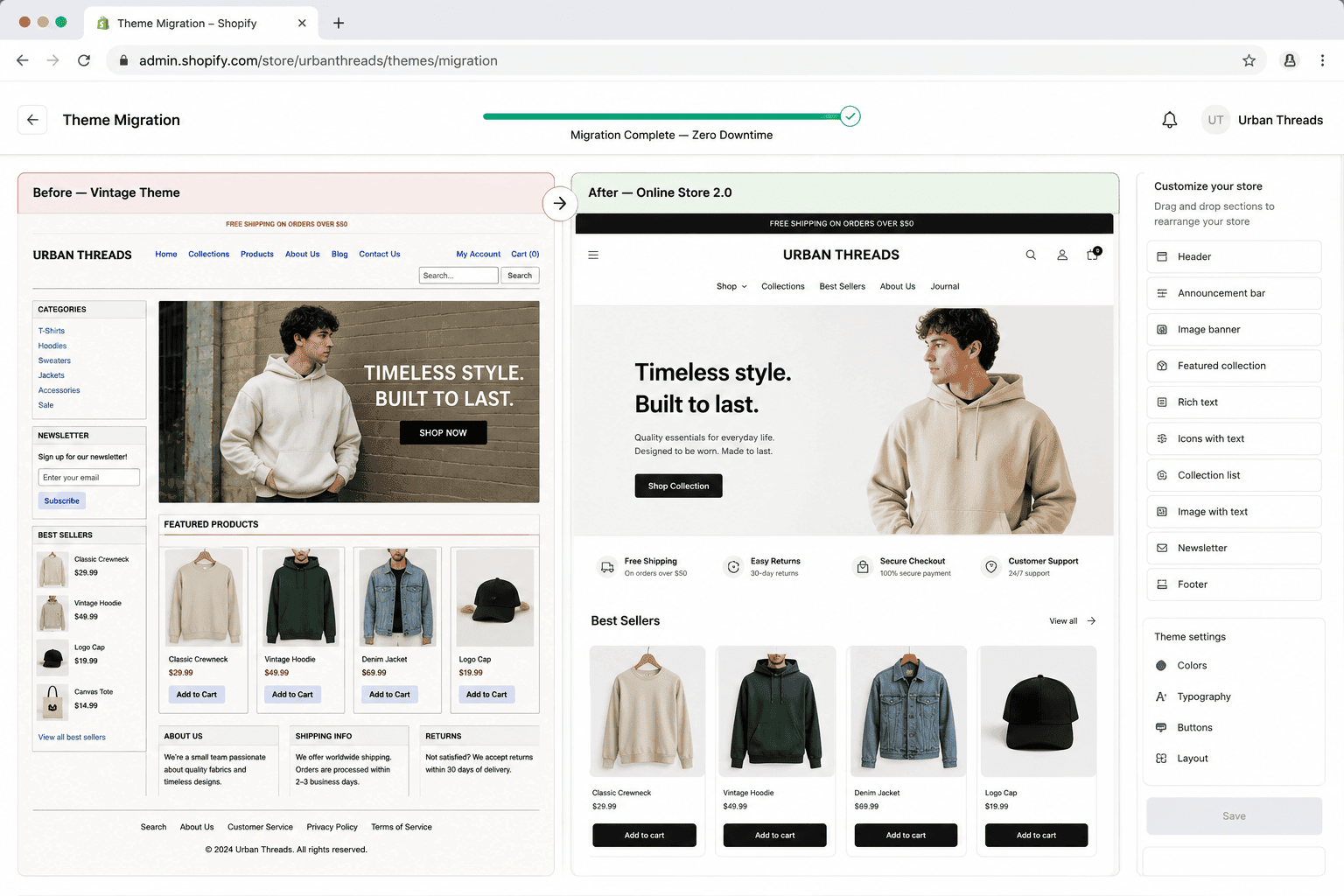
Why it matters
A vintage theme quietly taxes every campaign you run.
On a pre-2.0 theme, sections only exist on the homepage, so every landing page, campaign layout or new content block becomes a developer ticket. You also miss metafields, app blocks and the performance improvements that came with the newer architecture, which means you're paying more for slower work. Migration is not a redesign: the goal is to keep the brand and layout your customers already recognise while replacing the foundation underneath it. Once you're on 2.0, the marketing team can build pages themselves, and future development gets cheaper because the platform is doing more of the work.
Sound familiar?
A vintage theme announces itself in the same handful of ways.
If three or four of these are true, the architecture is costing you money every month. One on its own rarely justifies the work.
- Launching a campaign page means booking developer time weeks before the campaign itself.
- The customiser is nearly empty on product and collection templates — settings only, nothing rearrangeable.
- Installing an app still means someone editing theme code, because app blocks aren't available.
- You're storing specs and care instructions in the description field because metafields were never wired in.
- You've assumed migration means a redesign and a rebrand, so you keep postponing the decision.
- Your theme vendor stopped shipping updates years ago and support requests go unanswered.
What's included
What a theme migration includes
A structural upgrade with no visual regressions — staged, QA'd end to end, then swapped live in one click.
Vintage → OS 2.0 rebuild
Old Liquid templates rebuilt as JSON templates with sections available on every page type. We match the existing design closely so returning customers notice nothing, while your team gains the ability to reorder, add and remove sections on any template from the editor.
Content & metafield porting
Existing content, sections, blocks, settings and metafields are mapped and ported deliberately — not copy-pasted and hoped for. We inventory what exists first, so nothing silently disappears in the swap and no page comes back with empty modules after go-live.
Zero-downtime cutover
The new theme is built on a duplicate, reviewed on a preview link, and QA'd end to end including the full checkout path. Publishing is a single click at a low-traffic window, with the old theme retained so rollback is instant if anything looks wrong.
SEO preserved through the move
Templates keep their URLs, so this is far lower-risk than a platform migration — but structured data, canonicals, heading hierarchy and internal links are all verified before and after. We baseline Search Console and watch it for 30 days post-launch to catch anything unexpected early.
Performance modernisation
Migration is the natural moment to drop the accumulated weight: legacy jQuery, duplicated CSS, render-blocking scripts and dead code from apps you no longer use. Most stores come out of a migration meaningfully faster simply because a decade of build-up is gone.
Handover & enablement
Your team gets a walkthrough of the new section-based editing model, written documentation and the Git repository. The value of 2.0 only lands if people actually use sections and metafields, so we make sure the team knows how.
How it runs
How a migration actually runs.
Three to six weeks in most cases, with an audit in week one that decides whether migration or a ground-up rebuild is the honest recommendation.
- 01
Audit and inventory
We catalogue every template, section, setting, metafield and app hook currently in use, and flag what's already dead. That list becomes the acceptance checklist, so sign-off takes an afternoon rather than a month.
- 02
Rebuild as JSON
Templates are rebuilt as JSON with sections on every page type, on a duplicate theme tracked in Git. Legacy code that serves nothing gets removed rather than carried forward out of caution.
- 03
QA on preview
Both teams review a preview link across real devices, covering the full purchase path and every ported page. Anything that shifted visually is corrected before a customer could ever see it.
- 04
Cut over and watch
We publish during your quietest hour and keep the old theme unpublished, not deleted. Then we monitor rankings, speed and app behaviour for a month while your team learns the new editing model.
0
Downtime
Single-click cutover
OS 2.0
Target architecture
Sections everywhere
3–6wk
Typical timeline
Depends on templates
0
Design regressions
Same look, new foundation
Straight answer
Migration is the cheaper answer — when the design is still worth keeping.
A good fit if…
- Your design still works commercially and only the architecture underneath it holds you back.
- Marketing needs to build and edit pages without raising a request for every change.
- You're on a vintage theme with a manageable number of templates and custom sections.
- You want what 2.0 gives you without the cost, risk and timeline of a redesign.
Probably not, if…
- Your design is genuinely dated — migrating it preserves the same problem on newer plumbing.
- The theme has been customised so heavily that rebuilding from scratch is cheaper than untangling.
- You're already on an OS 2.0 theme; what you need is customisation work, not migration.
- You're hoping migration lifts sales by itself. It buys editability and speed, not persuasion.
Keep exploring
More on Shopify theme development
Theme Migration is one part of how we build Shopify themes. Here's the rest of the picture.
Shopify Theme Development
The complete service — design, build, launch and everything below, in one engagement.
View the serviceClosely relatedTheme Customization & Extensions
Once you're on 2.0, extend it with custom sections on a modern foundation.
Read the guideClosely relatedCustom Theme Development
If the design is also dated, a ground-up custom build may be the better spend.
Read the guideAll guides in this series
- Performance-First ThemesBuilt to a Core Web Vitals budget, not retrofitted for speed afterwards.
- Mobile-First Responsive DesignDesigned at 375px first — where most of your traffic and revenue is.
- Accessibility (WCAG 2.1 AA)Keyboard, screen-reader and contrast compliance built in, not bolted on.
- Conversion-Optimised PDP & PLPProduct and collection templates rebuilt around how people actually buy.
- Headless / Hydrogen ThemesReact storefronts on Oxygen — for when Liquid genuinely hits its ceiling.
Beyond this service
Other things we do
Most stores need two or three of these working together. Book a call and we'll tell you which ones actually move your numbers.
- Shopify Theme DevelopmentCustom themes built from Figma to production Liquid on Online Store 2.0 — fast and merchant-editable.
- Shopify App DevelopmentCustom and public apps, Checkout UI Extensions and Shopify Functions built with React and Polaris.
- Shopify MigrationMove from WooCommerce, Magento or BigCommerce with a full 301 redirect map and zero downtime.
- Shopify SEOTechnical audits, Core Web Vitals, structured data and collection content built around buyer intent.
- Shopify Performance OptimizationFaster load times and green Core Web Vitals — theme refactors, image pipelines and app cleanup.
- Shopify A/B TestingHypothesis-led experiments on product pages and checkout, shipped as native theme code.
- Shopify Email Marketing & KlaviyoFlows, segmentation and campaigns — welcome, abandoned cart, winback and SMS, built and monitored.
- Shopify CRO & FunnelsValue-ladder, tripwire, quiz and post-purchase upsell funnels built to lift conversion and AOV.
- Shopify Maintenance & SupportRetainers covering uptime monitoring, security patching, bug fixes and proactive improvements.
Frequently asked questions
- It shouldn't. Migration is a foundation change, not a redesign — we rebuild the same layout on the 2.0 architecture so returning customers notice nothing. If you do want design changes, we scope them separately so you can tell which change caused which result.
Still on a vintage theme?
Book a 30-minute technical call. We'll audit your current theme and tell you whether migration or a rebuild is the smarter move.
Book a free call