Shopify Theme App Extension Development
We build your app's storefront UI as app blocks and app embeds — components a merchant drags into any Online Store 2.0 theme from the theme editor. No snippets to paste, no forked theme to maintain, and nothing left behind when they uninstall.
Book a Free Technical Call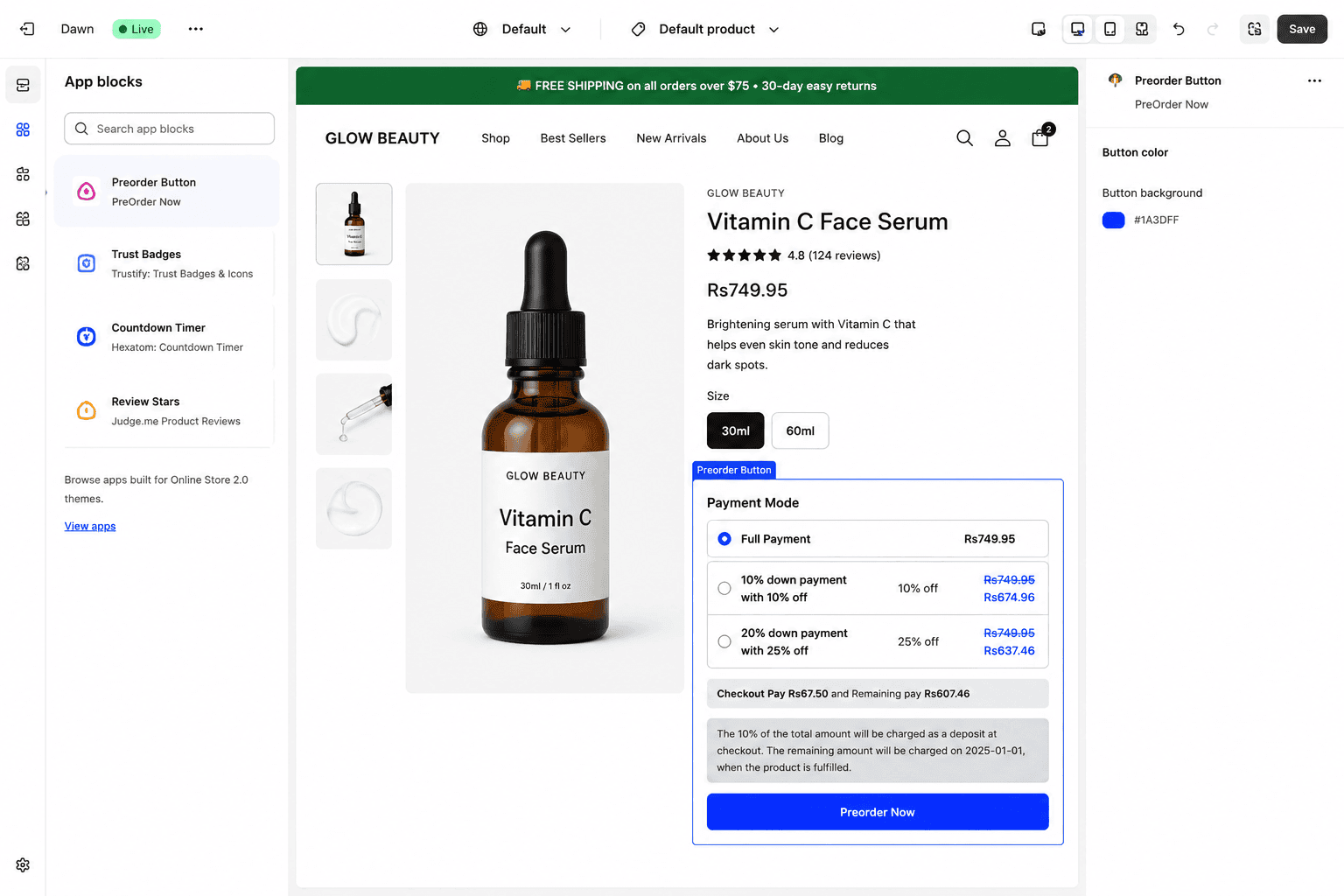
Why it matters
Writing into a merchant's theme is a liability, not an install flow.
The old pattern was to paste a snippet into theme.liquid, or write files through the Asset API, and hope nobody touched them. It breaks the moment the merchant changes theme, duplicates a theme, or accepts an update — and it leaves orphaned markup behind when they uninstall. Theme app extensions solve this properly: your UI ships as a versioned extension hosted by Shopify, the merchant adds it from the theme editor, and removing your app removes your code. It's also the only route to Built for Shopify status for anything that renders on the storefront, so this stopped being optional some time ago.
Sound familiar?
The symptoms are always the same.
Most of these come from an install flow that was reasonable in 2019 and has been quietly costing you support hours ever since.
- Your app installs by editing theme.liquid, and every theme update or redeploy quietly breaks it.
- You maintain a forked copy of a merchant's theme just so your app renders correctly.
- Uninstalling your app leaves orphaned script tags and empty divs merchants have to delete themselves.
- Your support queue is full of merchants asking where exactly to paste your snippet.
- You assume app blocks are too limited for anything complex, so you kept injecting scripts.
- Merchants want to move your widget in the theme editor and need a developer to do it.
What's included
What a theme app extension build includes
Your storefront surface, rebuilt as blocks merchants can place, configure and remove themselves.
App blocks and app embeds
Blocks for anything with a position on the page — badges, widgets, review summaries, size guides. App embeds for the invisible things that need to load everywhere, like tracking or a floating launcher. We pick the right one per feature rather than defaulting everything to an embed.
Settings merchants understand
Every block gets a schema of settings exposed in the theme editor — text, colour, alignment, product pickers, toggles. Sensible defaults and presets mean the block looks correct the second it's dropped in, so nobody needs your documentation to get a usable result.
A real performance budget
Extension assets are served from Shopify's CDN and versioned per release. We keep JavaScript deferred, avoid render-blocking CSS, and measure Lighthouse before and after the block is added. An app that costs the merchant Core Web Vitals gets uninstalled, whatever it does.
Clean install and uninstall
No Asset API writes, no theme.liquid edits, no snippets for the merchant to remove later. When the app is uninstalled the extension stops rendering and the theme is exactly as it was. That single property removes most of the support burden these features usually carry.
Theme-agnostic rendering
Tested against Dawn and the popular commercial themes, not just the one your first customer uses. Scoped styles so a merchant's CSS doesn't wreck your block and your block doesn't wreck their layout, plus sane behaviour at every breakpoint.
Built for Shopify readiness
If you're pursuing Built for Shopify, storefront UI has to ship as a theme app extension. We build to that standard from the start — performance, install experience and the technical checks — rather than retrofitting it during a failed review.
How it runs
How we rebuild your storefront surface.
Typically 3–6 weeks for a first extension. Most of the range comes from how much existing injected code has to be re-architected as blocks.
- 01
Audit the injection
We inventory every place your app currently writes into a theme — snippets, script tags, Asset API calls, manual instructions. Some of it turns out to be dead. The rest becomes the block specification you sign off on.
- 02
Design the blocks
Which features are blocks with a position, which are app embeds, and what settings each one exposes. We keep the settings list short on purpose: every option you add is a support question you'll answer forever.
- 03
Build and theme-test
Extension built, settings schema wired, styles scoped. Then tested across Dawn and the commercial themes your merchants actually run, on mobile and desktop, with Lighthouse checked before and after the block is placed.
- 04
Ship and migrate
Released alongside a migration path for existing installs, so merchants move off the old snippet without losing configuration. We stay on for the first support cycle, because that's when real theme edge cases surface.
0
Theme files edited
No Asset API writes
OS 2.0
Any compatible theme
Added from the editor
Clean
Uninstall
Nothing left behind
CDN
Shopify-hosted assets
Versioned per release
Straight answer
Worth being clear about when this isn't the answer.
A good fit if…
- You have a public or custom app that needs to render something on the storefront.
- You're chasing Built for Shopify status, where theme app extensions are now a requirement.
- Your install flow asks merchants to paste code, and your support tickets prove it.
- You need merchants to position and configure your widget without involving a developer.
Probably not, if…
- Your merchants are still on vintage themes — app blocks require Online Store 2.0.
- You need to control a whole page layout; an app block owns its slot, not the page.
- The functionality belongs in checkout — that's checkout UI extensions, a different surface entirely.
- You just want a widget on your own store; a theme section is simpler and cheaper.
Keep exploring
More on Shopify app development
Theme App Extensions is one part of how we build Shopify apps. Here's the rest of the picture.
Shopify App Development
The complete service — custom apps, extensions and Functions, in one engagement.
View the serviceClosely relatedCheckout UI Extensions
The other extension surface — what you can and can't change inside Shopify's checkout.
Read the guideClosely relatedCustom App Development
The app behind the block: custom apps built for one store, from ERP sync to ops tooling.
Read the guideAll guides in this series
- Public App DevelopmentListed App Store apps — billing, OAuth, review submission and ongoing support.
- Embedded Admin AppsTools that live inside Shopify admin, built with Polaris and App Bridge.
- Customer Account ExtensionsOrder tracking, subscriptions and self-service inside new customer accounts.
- POS UI ExtensionsIn-store workflows on Shopify POS — custom tiles, actions and staff tooling.
- Shopify Functions DevelopmentBackend cart, discount and delivery logic running on Shopify's own infrastructure.
Beyond this service
Other things we do
Most stores need two or three of these working together. Book a call and we'll tell you which ones actually move your numbers.
- Shopify Theme DevelopmentCustom themes built from Figma to production Liquid on Online Store 2.0 — fast and merchant-editable.
- Shopify App DevelopmentCustom and public apps, Checkout UI Extensions and Shopify Functions built with React and Polaris.
- Shopify MigrationMove from WooCommerce, Magento or BigCommerce with a full 301 redirect map and zero downtime.
- Shopify SEOTechnical audits, Core Web Vitals, structured data and collection content built around buyer intent.
- Shopify Performance OptimizationFaster load times and green Core Web Vitals — theme refactors, image pipelines and app cleanup.
- Shopify A/B TestingHypothesis-led experiments on product pages and checkout, shipped as native theme code.
- Shopify Email Marketing & KlaviyoFlows, segmentation and campaigns — welcome, abandoned cart, winback and SMS, built and monitored.
- Shopify CRO & FunnelsValue-ladder, tripwire, quiz and post-purchase upsell funnels built to lift conversion and AOV.
- Shopify Maintenance & SupportRetainers covering uptime monitoring, security patching, bug fixes and proactive improvements.
Frequently asked questions
- Technically some legacy paths still work, but you shouldn't rely on them. Asset API access is restricted for new public apps, storefront UI has to be a theme app extension to qualify for Built for Shopify, and theme editing was always fragile — a theme swap, a duplicate, or an update breaks it silently. If your app is live and still injecting code, the migration is worth doing before it's forced on you.
Still installing via copy-paste?
Book a 30-minute technical call. We'll look at how your app reaches the storefront today and tell you whether a theme app extension is worth the rebuild.
Book a free call