Shopify Embedded Admin App Development
An embedded app runs inside Shopify admin, so merchants never leave the interface they already know. Done well it feels like part of the platform: Polaris components, App Bridge navigation, session token auth, and actions that appear on the order and product pages where the work actually happens. Done badly it's an iframe with a login screen inside it — and merchants notice immediately.
Book a Free Technical Call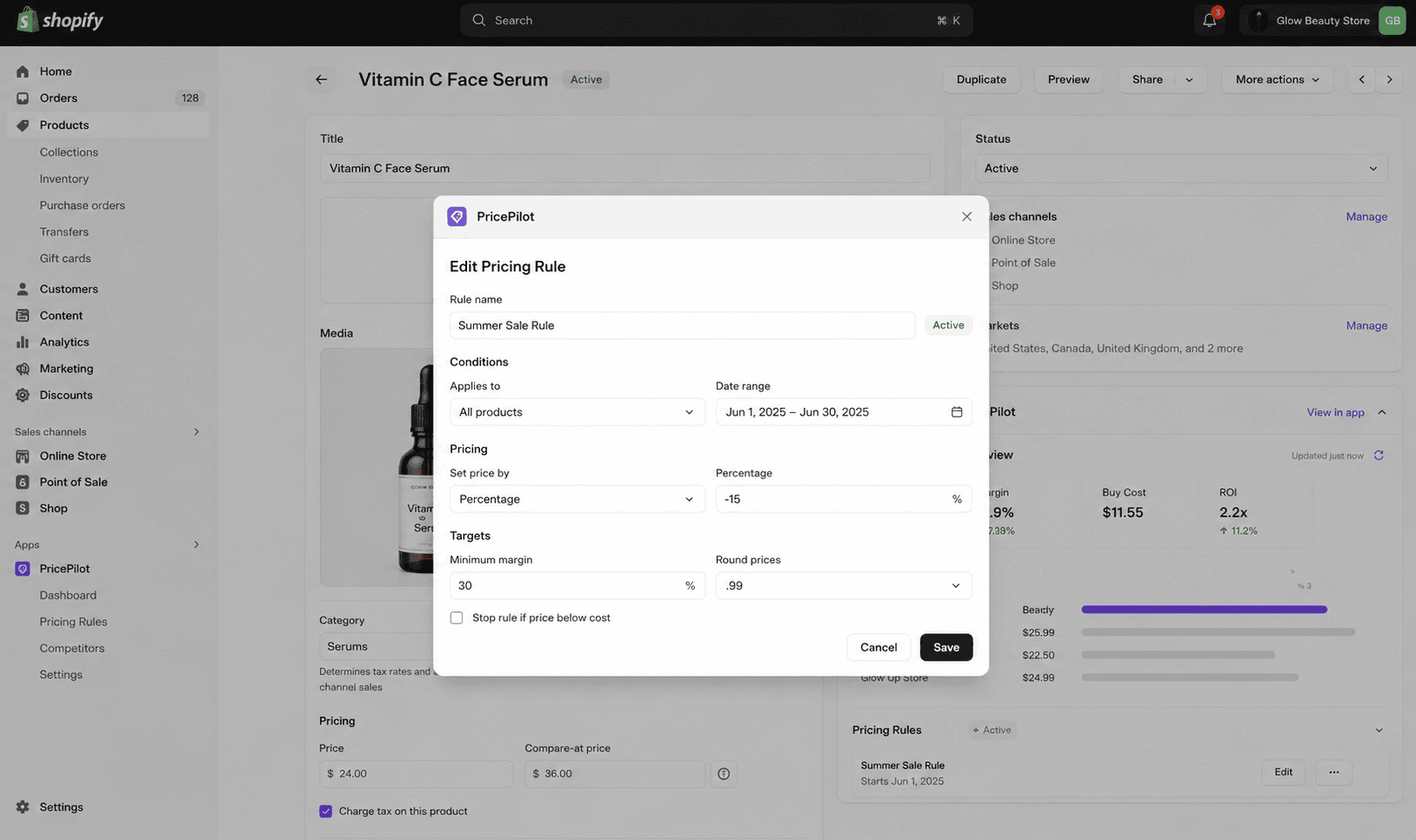
Why it matters
Merchants don't want another tool. They want their tool to be where they already are.
Staff spend their day in Shopify admin. Every workflow that lives somewhere else costs a context switch, a second login and a slice of adoption — which is why standalone dashboards built for merchant teams so often go unused after month one. Embedding solves that, but only if the app genuinely behaves like admin: consistent components, working browser navigation, no nested scrollbars, no separate authentication. Shopify's embedded stack exists precisely to make that possible, and the gap between an app that uses it properly and one that bolts an existing web app into an iframe is obvious within about five seconds of use.
Sound familiar?
Embedded admin work usually starts with one of these.
Most are good reasons to build inside admin. One of them is the assumption that gets apps rejected or abandoned.
- Your team runs a separate dashboard for store operations and half of them stopped logging into it.
- Staff copy order numbers between Shopify admin and another tool a hundred times a week.
- You have a public app and its interface looks and behaves nothing like Shopify.
- You want an approval or review step attached to specific orders, not a separate queue.
- You assume an existing web app can just be dropped into an iframe and called embedded.
- Your app's settings screen is where merchants get stuck, and support tickets prove it.
What's included
What an embedded admin build includes
An interface that behaves like part of Shopify admin, authenticated the way Shopify expects.
Polaris design system
Built with Shopify's own component library, so spacing, typography, form patterns and empty states match admin exactly. Merchants don't have to learn a new interface, and you inherit Polaris's accessibility work rather than rebuilding it from scratch.
App Bridge integration
Navigation, modals, toasts, resource pickers and the contextual save bar wired through App Bridge, so the app uses admin's own UI primitives. Browser back works, deep links resolve, and the app doesn't trap itself inside a scrolling iframe.
Session token authentication
Auth via App Bridge session tokens exchanged for access tokens on the server — no cookies, which matters because third-party cookies inside an iframe are unreliable and effectively finished. Tokens verified server-side on every request, never trusted from the client.
Admin UI extensions
Admin actions and admin blocks that surface your app directly on order, product and customer pages. Staff complete the task in context instead of navigating to your app, copying an ID and navigating back — which is where most of the adoption gain actually comes from.
Performance inside the frame
Embedded apps carry admin's load before yours begins, so a slow first render feels considerably slower than the same page standalone. We keep bundles lean, render server-side where it helps, and hold the app to a load budget rather than measuring it once at the end.
Modern app framework
Remix or Next with TypeScript end to end, the Shopify CLI for local development against a real development store, and typed GraphQL Admin API queries. Structured and documented so your team, or the next developer, can work in it without archaeology.
How it runs
How an embedded admin build actually runs.
Typically 4–10 weeks depending on how much backend work sits behind the interface and whether extensions are in scope.
- 01
Map the admin journey
We work out where each task belongs — a full app page, an admin block on the product page, or an action on the order. Getting this wrong is the main reason merchants stop opening an app after the first week.
- 02
Set up the shell
App framework, session token auth, App Bridge and Polaris scaffolding, running locally against a development store through the Shopify CLI. The authentication and navigation layer is proven before any feature work starts.
- 03
Build the interface
Screens and extensions built with Polaris components, reviewed inside real admin rather than in isolation. Empty states, loading states and error copy are written as part of each screen, not added afterwards.
- 04
Test and hand over
Verified across desktop and the Shopify mobile app, checked against a load budget, then documented. If it's a public app, we take it through review; if custom, we hand over the repository and runbook.
Polaris
Design system
Matches admin exactly
App Bridge
Navigation & modals
Admin's own primitives
Session tokens
Authentication
No third-party cookies
Extensions
Actions & blocks
On order and product pages
Straight answer
Embedding is right when the work belongs in admin. Not everything does.
A good fit if…
- The people using this already spend most of their working day inside Shopify admin.
- The task attaches naturally to an order, product, customer or inventory record.
- You want one login and one permission model rather than a separate user directory.
- You're building a public app, where an embedded Polaris interface is effectively the expected standard.
Probably not, if…
- Your users are customers or suppliers who have no Shopify admin account at all.
- The workflow needs a dense multi-pane interface that Polaris and the admin frame constrain badly.
- You want your own brand and visual identity to dominate — embedded apps should look like Shopify.
- You already have a working standalone tool and adoption is fine. Embedding solves a problem you don't have.
Keep exploring
More on Shopify app development
Embedded Admin Apps is one part of how we build Shopify apps. Here's the rest of the picture.
Shopify App Development
The complete service — custom apps, extensions and Functions, in one engagement.
View the serviceClosely relatedPublic App Development
The full listing path — OAuth, Billing API, GDPR webhooks and App Store review.
Read the guideClosely relatedCustom App Development
The backend behind the interface — ERP integrations, automation and internal tooling.
Read the guideAll guides in this series
- Theme App ExtensionsApp blocks merchants drop into any OS 2.0 theme — no code edits, no forked themes.
- Checkout UI ExtensionsUpsells, custom fields and trust content inside Shopify's own checkout.
- Customer Account ExtensionsOrder tracking, subscriptions and self-service inside new customer accounts.
- POS UI ExtensionsIn-store workflows on Shopify POS — custom tiles, actions and staff tooling.
- Shopify Functions DevelopmentBackend cart, discount and delivery logic running on Shopify's own infrastructure.
Beyond this service
Other things we do
Most stores need two or three of these working together. Book a call and we'll tell you which ones actually move your numbers.
- Shopify Theme DevelopmentCustom themes built from Figma to production Liquid on Online Store 2.0 — fast and merchant-editable.
- Shopify App DevelopmentCustom and public apps, Checkout UI Extensions and Shopify Functions built with React and Polaris.
- Shopify MigrationMove from WooCommerce, Magento or BigCommerce with a full 301 redirect map and zero downtime.
- Shopify SEOTechnical audits, Core Web Vitals, structured data and collection content built around buyer intent.
- Shopify Performance OptimizationFaster load times and green Core Web Vitals — theme refactors, image pipelines and app cleanup.
- Shopify A/B TestingHypothesis-led experiments on product pages and checkout, shipped as native theme code.
- Shopify Email Marketing & KlaviyoFlows, segmentation and campaigns — welcome, abandoned cart, winback and SMS, built and monitored.
- Shopify CRO & FunnelsValue-ladder, tripwire, quiz and post-purchase upsell funnels built to lift conversion and AOV.
- Shopify Maintenance & SupportRetainers covering uptime monitoring, security patching, bug fixes and proactive improvements.
Frequently asked questions
- Not technically, but for anything used by store staff it's the sensible default and merchants increasingly expect it. Standalone apps lose adoption to the extra login and the context switch. The genuine exceptions are tools for people without admin accounts — customers, suppliers, warehouse partners — or interfaces so dense that the admin frame and Polaris patterns actively get in the way.
Building something for admin?
Book a 30-minute technical call. Tell us who uses it and what they're trying to do, and we'll tell you where in admin it belongs.
Book a free call