Shopify Checkout UI Extension Development
Post-purchase upsells, custom order fields, delivery instructions and trust content — built as extensions inside Shopify's own checkout rather than bolted onto it. checkout.liquid is gone, and this is the supported replacement.
Book a Free Technical Call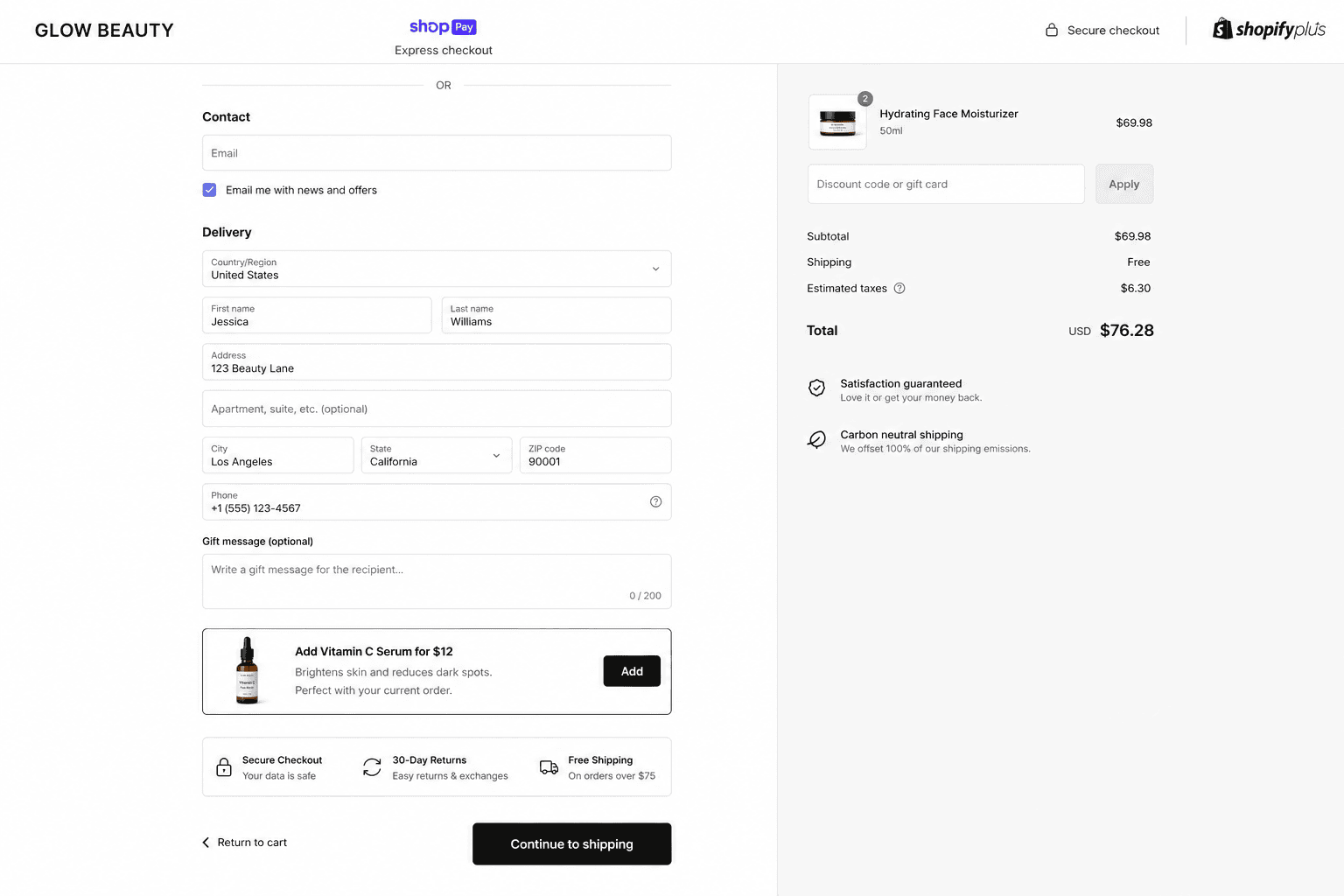
Why it matters
Shopify owns the checkout. Your job is to work inside it well.
checkout.liquid has been deprecated, and the customisations merchants relied on for years no longer have a home. Checkout extensibility replaces it with a sandboxed extension model: your code runs in a web worker, renders through Shopify's own UI components, and can't touch the DOM. That's a constraint, and it's the right one — it's why the checkout stays PCI compliant, keeps Shop Pay and accelerated wallets working, and doesn't break when Shopify ships an update. Be clear on the plan gating, though. Extensions on the Thank you and Order status pages, and post-purchase offers, are available broadly. Extensions inside the checkout steps themselves — along with branding controls, custom fields at checkout and validation rules — are Shopify Plus features. If you're not on Plus, half the ideas in your brief aren't available at any price.
Sound familiar?
How checkout work usually lands on your desk.
Some of these have a clean answer inside checkout extensibility. Others need Plus, or need a different surface entirely.
- Your checkout.liquid customisations stopped working and nobody on the team owns the replacement.
- You want a post-purchase upsell that doesn't touch the order the customer just approved.
- Your B2B buyers need a PO number at checkout, and the notes box isn't cutting it.
- You assume checkout extensions let you redesign the checkout layout — they deliberately don't.
- Delivery instructions arrive in three different places and your warehouse ignores all of them.
- Customers stall at payment because your returns policy and guarantee live two clicks away.
What's included
What a checkout extension build includes
Scoped to what your plan actually permits, then built to survive every payment method and device.
The right extension target
There are many places an extension can render — beside the delivery options, under the order summary, on the Thank you page, in the order status view. We pick targets by where the customer's question actually occurs, not by where there happens to be space.
Post-purchase offers
An upsell shown after payment is captured but before the confirmation page, so the original order is never put at risk. Honest caveat: post-purchase offers don't render for every payment method, so a share of your orders will simply never see one.
Custom fields and instructions
PO numbers, ABNs, delivery notes, gift messages, cut-off acknowledgements — captured at checkout and written onto the order as attributes or metafields, so your 3PL and support team read them from the order rather than from an email thread.
Validation and rules
On Plus, we can block or gate checkout completion — rejecting PO boxes, enforcing minimums for a market, requiring a field before the customer proceeds. This runs through checkout validation and Shopify Functions, not client-side JavaScript that a determined browser ignores.
Shopify's own components
Extensions render with Shopify's checkout component library, which inherits the merchant's branding automatically and stays accessible. You don't get arbitrary CSS or DOM access. Designs that assume otherwise get rewritten in the first week, so we resolve that before anyone builds.
Measured on completion rate
Anything added to a checkout is a risk to the one funnel step you cannot afford to damage. We instrument checkout completion before launch and watch it after, and we'll recommend removing an extension that earns less than it costs in abandonment.
How it runs
How a checkout extension project runs.
Usually 2–5 weeks per extension. Discovery is short. The time goes into testing across payment methods, markets and devices, which is where these builds fail.
- 01
Confirm what's possible
We check your plan, your existing checkout apps and the surfaces you're asking about, then tell you which items in the brief are buildable now, which need Plus, and which belong somewhere other than checkout.
- 02
Read the checkout data
Where customers actually drop, which fields support keeps chasing after the order, and what the current abandonment pattern looks like. Without this baseline you can't tell whether the extension helped or quietly cost you orders.
- 03
Build in the sandbox
The extension is built against Shopify's component library, wired to order attributes or metafields, and reviewed on a development store with the merchant's real branding applied so nobody is surprised by how it looks.
- 04
Test every payment path
Cards, wallets, Shop Pay, local methods, express checkout, mobile. Post-purchase behaviour differs across them and so does rendering. Then we watch completion rate for a fortnight after launch, not just the day of.
Plus
For in-checkout steps
Thank you page is broader
Sandboxed
Web worker runtime
No DOM, no custom scripts
Native
PCI compliance
Shopify still owns checkout
Post-purchase
Offers after payment
Original order untouched
Straight answer
The honest scope of what checkout extensions can do.
A good fit if…
- You're on Shopify Plus with specific checkout requirements no settings toggle can cover.
- You're carrying checkout.liquid customisations that need a supported home before they break.
- You want post-purchase offers and accept they won't render for every payment method.
- You sell B2B or regulated goods and must capture extra fields at the moment of order.
Probably not, if…
- You're not on Plus and want conditional logic or branding inside the checkout steps.
- You want a bespoke checkout layout — Shopify owns that surface and will keep owning it.
- Your idea needs DOM access or custom scripts; the sandbox exists precisely to prevent that.
- You have no checkout analytics baseline — fix measurement first or you'll never know the result.
Keep exploring
More on Shopify app development
Checkout UI Extensions is one part of how we build Shopify apps. Here's the rest of the picture.
Shopify App Development
The complete service — custom apps, extensions and Functions, in one engagement.
View the serviceClosely relatedShopify Functions Development
The logic behind the UI — discounts, cart transforms and delivery rules running server-side.
Read the guideClosely relatedCustomer Account Extensions
What happens after checkout: tracking, returns and subscription self-service in the account.
Read the guideAll guides in this series
- Custom App DevelopmentPrivate apps built for one store — ERP integrations, ops automation, internal tools.
- Public App DevelopmentListed App Store apps — billing, OAuth, review submission and ongoing support.
- Embedded Admin AppsTools that live inside Shopify admin, built with Polaris and App Bridge.
- Theme App ExtensionsApp blocks merchants drop into any OS 2.0 theme — no code edits, no forked themes.
- POS UI ExtensionsIn-store workflows on Shopify POS — custom tiles, actions and staff tooling.
Beyond this service
Other things we do
Most stores need two or three of these working together. Book a call and we'll tell you which ones actually move your numbers.
- Shopify Theme DevelopmentCustom themes built from Figma to production Liquid on Online Store 2.0 — fast and merchant-editable.
- Shopify App DevelopmentCustom and public apps, Checkout UI Extensions and Shopify Functions built with React and Polaris.
- Shopify MigrationMove from WooCommerce, Magento or BigCommerce with a full 301 redirect map and zero downtime.
- Shopify SEOTechnical audits, Core Web Vitals, structured data and collection content built around buyer intent.
- Shopify Performance OptimizationFaster load times and green Core Web Vitals — theme refactors, image pipelines and app cleanup.
- Shopify A/B TestingHypothesis-led experiments on product pages and checkout, shipped as native theme code.
- Shopify Email Marketing & KlaviyoFlows, segmentation and campaigns — welcome, abandoned cart, winback and SMS, built and monitored.
- Shopify CRO & FunnelsValue-ladder, tripwire, quiz and post-purchase upsell funnels built to lift conversion and AOV.
- Shopify Maintenance & SupportRetainers covering uptime monitoring, security patching, bug fixes and proactive improvements.
Frequently asked questions
- For the checkout steps themselves, yes. Customising the information, shipping and payment steps — plus branding controls, custom fields at checkout and validation rules — is a Shopify Plus capability. Extensions on the Thank you and Order status pages, and post-purchase offers, are available much more broadly. So a non-Plus merchant can still do useful work after payment; they can't rebuild the checkout flow itself. We'll tell you which side of that line your brief sits on before you commit budget.
Something specific in mind for checkout?
Book a 30-minute technical call. We'll tell you what's buildable on your plan, what needs Plus, and what isn't possible at all.
Book a free call