Shopify POS UI Extension Development
Your stores run on workarounds Shopify POS doesn't know about — a notebook by the till, a phone call to head office, a laptop open in the stockroom. POS UI Extensions put those workflows on the smart grid and in the cart, using Shopify's own components, so staff stop leaving the app to do their job.
Book a Free Technical Call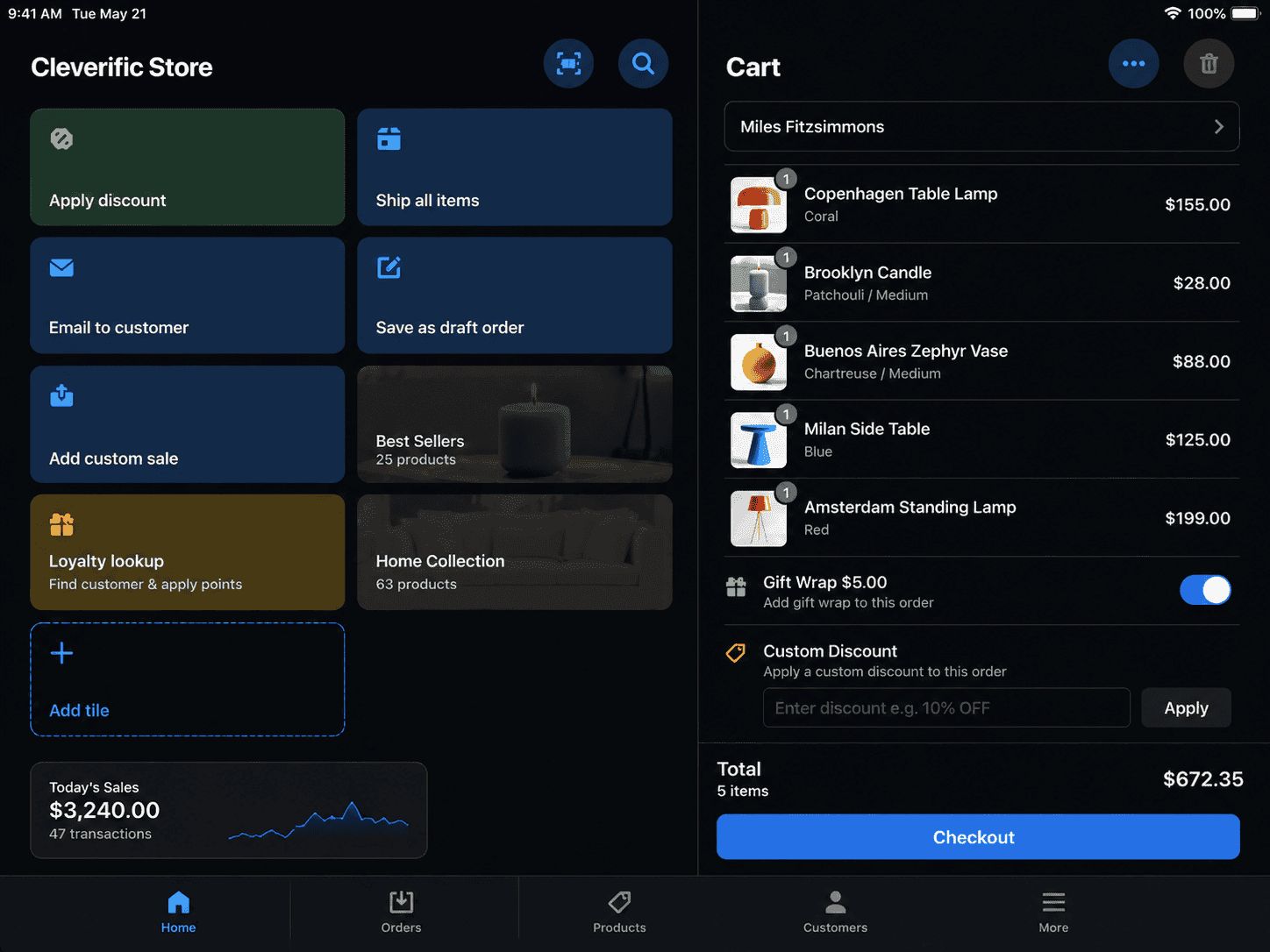
Why it matters
Retail problems are rarely Shopify's fault. They're the gap between the platform and your floor.
Shopify POS assumes a fairly standard way of selling. Most retailers aren't standard — you have trade accounts, made-to-order lines, appointments, consignment stock or a returns policy that needs a human decision. POS UI Extensions close that gap by adding your workflow directly to the surfaces staff already use: the smart grid, the cart, the product screen. They're built with Shopify's POS components, so they look native, respect staff permissions and keep working through app updates. What they can't do is replace the POS interface. Extensions add to it; they don't rebuild it. If what you actually want is a fully custom till, POS is the wrong platform and we'd rather tell you that before you spend anything.
Sound familiar?
You already know where the friction is. It's the thing staff apologise for.
Some of these are worth building. One of them is a misunderstanding of what POS extensions can do — and we'll tell you which is which on the first call.
- Your staff leave the POS to check stock in the admin, then walk back to the customer.
- Your loyalty programme is online-only, so in-store customers earn nothing at the till.
- Your returns process needs a manager, a printed receipt and a call to head office.
- You want the POS interface rebuilt in your branding, replacing Shopify's till UI entirely.
- Your store team keeps a paper notebook for the one workflow Shopify POS doesn't cover.
- You run clienteling or appointments, and none of that context reaches the person serving.
What's included
What a POS extension build includes
Workflows designed on the shop floor, built into the POS app itself, and supported through your first trading period.
Smart grid tiles
The POS home screen is the most valuable space in your store. We add tiles that open straight into a workflow — stock across every location, a made-to-order form, an appointment lookup — instead of making staff dig through menus. Tiles can render live state, so the label tells an assistant something useful before they tap it.
Cart and checkout actions
Actions attached to the cart: apply a trade account's pricing tier, attach a delivery date, capture fitting notes, or write a line-item property your warehouse actually reads. The data lands on the order as properties or metafields, so it carries through to fulfilment and reporting rather than living in a staff member's memory.
Product and inventory lookups
Staff scan or select a product and see what head office sees — stock at every location, incoming transfers, why a line is on backorder. We read it live from the Admin API rather than syncing a stale copy, so nobody promises a customer something that sold in another store an hour ago.
Loyalty, returns and clienteling
Points balances, tier status, gift-card values and return eligibility surfaced inside POS. Where the source of truth is a third-party loyalty or CRM platform, the extension calls it directly. Where it's Shopify, we use customer metafields. Either way, staff stop ringing head office to answer a question a screen should answer.
Permissions and offline reality
Extensions respect POS staff roles, so a casual can't approve a manager-only override. And we design for a shop floor with patchy wifi — explicit failure states, sensible retries, and a documented manual fallback. Shopify POS has its own limited offline handling for transactions; your custom API calls have none.
Built, deployed, supported
The extension ships inside a Shopify app — usually a custom app scoped to your stores, occasionally a public one. Built with the Shopify CLI, version-controlled, deployed and rolled back like any other code. We document the workflow for your retail ops lead and stay close through the first trading period.
How it runs
How a POS extension project actually runs.
Typically 4–8 weeks from the first store visit to a fleet-wide rollout, depending on how many workflows you're replacing and how many locations you're training.
- 01
Watch the floor
We spend time in a store during trading, not on a video call. The workaround staff describe and the workaround they actually perform are rarely the same thing, and that difference decides what gets built.
- 02
Pick the surfaces
POS extensions attach to defined targets — smart grid tiles, cart and product actions, modal blocks. We map each workflow to the right one, then cut anything that adds a tap instead of removing one.
- 03
Build and pilot
Development store first, then one real shop for a full trading week. Staff who weren't in the workshop use it cold. Whatever confuses them gets fixed before another location sees it.
- 04
Roll out and train
Deployed across the fleet with a one-page guide written for someone on their second shift. We watch error rates for the first month and keep the manual fallback documented rather than verbal.
React
POS UI Extensions
Shopify's own components
Smart grid
Tiles & modals
Staff-facing entry points
Admin API
Live store data
Stock, orders, customers
POS Pro
Assumed tier
For most custom surfaces
Straight answer
POS extensions are worth it for some retailers and a waste of money for others.
A good fit if…
- You run several stores on Shopify POS and staff repeat the same workaround every single day.
- You have a real system of record — ERP, loyalty or PIM — worth surfacing at the till.
- Your in-store workflow is specific enough that nothing in the App Store genuinely fits it.
- You already sell online on Shopify and want one inventory, customer and order source.
Probably not, if…
- You want the POS checkout redesigned — extensions add to that interface, they don't replace it.
- You're on POS Lite; most of what makes this worthwhile assumes the Pro tier.
- One store, modest volume, and staff cope fine — the build cost won't come back.
- Your stores must keep working through internet outages; custom extension calls need connectivity.
Keep exploring
More on Shopify app development
POS UI Extensions is one part of how we build Shopify apps. Here's the rest of the picture.
Shopify App Development
The complete service — custom apps, extensions and Functions, in one engagement.
View the serviceClosely relatedCustom App Development
POS extensions ship inside an app — here's how we build custom apps for one merchant.
Read the guideClosely relatedEmbedded Admin Apps
The head-office half: tooling inside Shopify admin, built with Polaris and App Bridge.
Read the guideAll guides in this series
- Public App DevelopmentListed App Store apps — billing, OAuth, review submission and ongoing support.
- Theme App ExtensionsApp blocks merchants drop into any OS 2.0 theme — no code edits, no forked themes.
- Checkout UI ExtensionsUpsells, custom fields and trust content inside Shopify's own checkout.
- Customer Account ExtensionsOrder tracking, subscriptions and self-service inside new customer accounts.
- Shopify Functions DevelopmentBackend cart, discount and delivery logic running on Shopify's own infrastructure.
Beyond this service
Other things we do
Most stores need two or three of these working together. Book a call and we'll tell you which ones actually move your numbers.
- Shopify Theme DevelopmentCustom themes built from Figma to production Liquid on Online Store 2.0 — fast and merchant-editable.
- Shopify App DevelopmentCustom and public apps, Checkout UI Extensions and Shopify Functions built with React and Polaris.
- Shopify MigrationMove from WooCommerce, Magento or BigCommerce with a full 301 redirect map and zero downtime.
- Shopify SEOTechnical audits, Core Web Vitals, structured data and collection content built around buyer intent.
- Shopify Performance OptimizationFaster load times and green Core Web Vitals — theme refactors, image pipelines and app cleanup.
- Shopify A/B TestingHypothesis-led experiments on product pages and checkout, shipped as native theme code.
- Shopify Email Marketing & KlaviyoFlows, segmentation and campaigns — welcome, abandoned cart, winback and SMS, built and monitored.
- Shopify CRO & FunnelsValue-ladder, tripwire, quiz and post-purchase upsell funnels built to lift conversion and AOV.
- Shopify Maintenance & SupportRetainers covering uptime monitoring, security patching, bug fixes and proactive improvements.
Frequently asked questions
- In practice this work assumes POS Pro. The custom smart grid surfaces and staff-permission controls that make an extension worth building are Pro-tier features, and Lite is deliberately limited to basic selling. If you're on Lite across a fleet of stores, the honest first step is pricing Pro before pricing development — the upgrade often solves part of the problem on its own.
Got a workflow your POS can't handle?
Book a 30-minute call. Describe what your staff currently do by hand and we'll tell you whether an extension fixes it — or whether the answer is cheaper than a build.
Book a free call