Shopify Customer Account UI Extensions
Order tracking, returns, subscription management and reordering — built directly into Shopify's new customer accounts instead of a separate portal on a different domain. Customers log in once, passwordlessly, and find the answer themselves.
Book a Free Technical Call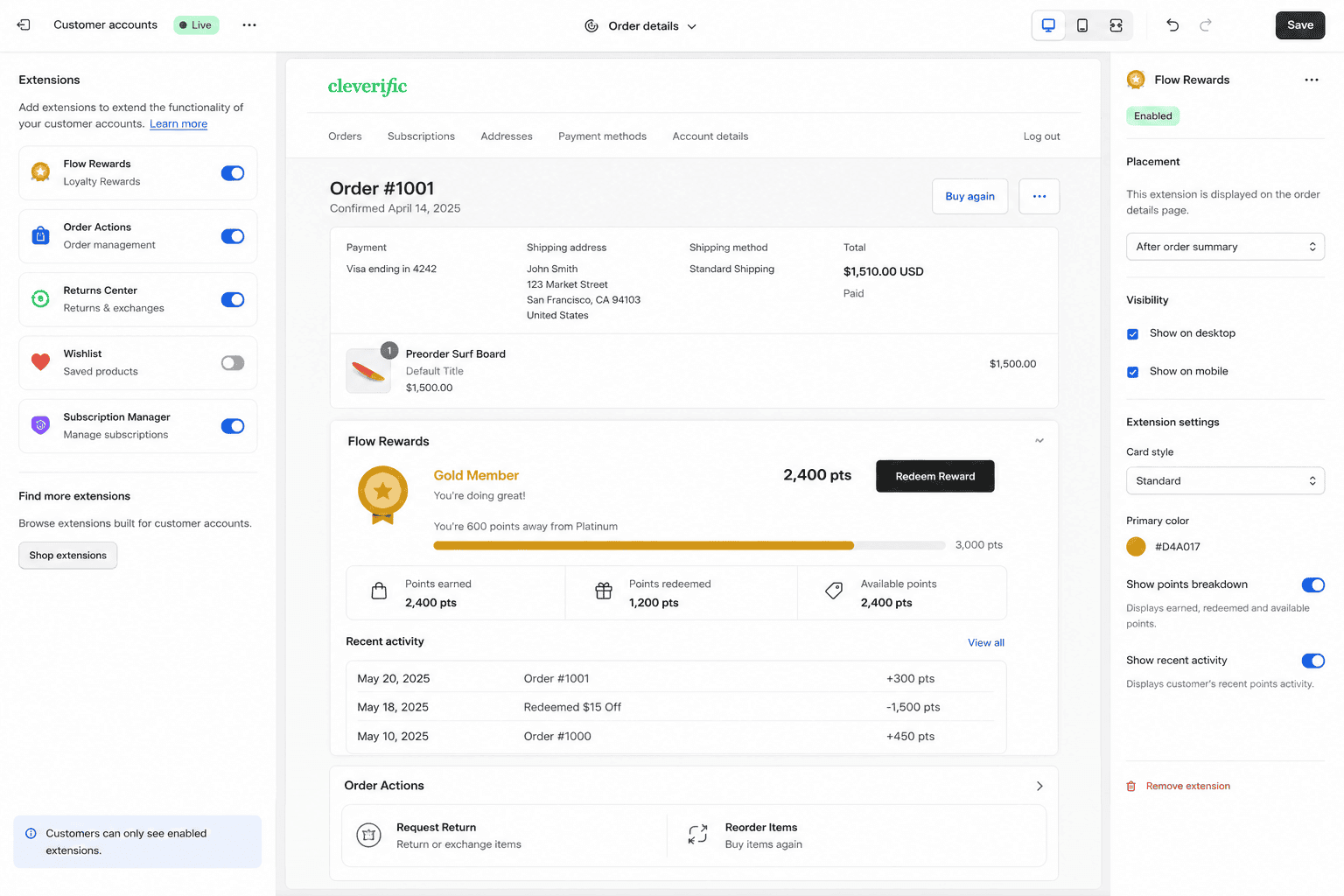
Why it matters
Most support tickets are questions your account pages should already answer.
Where is my order, can I change the address, how do I skip next month, can I return this. Every one of those is a screen, not a conversation — but only if the screen exists and the customer can find it. Shopify's new customer accounts give you a passwordless login and an extension framework that lets you put real functionality on the order index, the order status page and the profile, including full-page extensions with their own menu item. The catch is the prerequisite: extensions only run on new customer accounts, so stores still on classic accounts have a migration to do first. And the surface is Shopify's, so you inherit its layout and its branding limits rather than designing a portal from scratch.
Sound familiar?
You already know if this is your store.
The pattern is a support team doing work that a screen could do, and customers who never realised the account area existed.
- Your support inbox is mostly questions your order pages could answer without a human involved.
- Subscribers email you to skip, swap or pause because the portal only offers cancel.
- Returns start with a form, become a spreadsheet, then get re-keyed into your 3PL.
- You assume customer accounts are just a login page you have no control over.
- Your subscription app has its own portal on another domain and customers get lost reaching it.
- Trade buyers can't see invoices or reorder without phoning their account manager every time.
What's included
What a customer account extension build includes
Self-service screens where customers already are, wired to the systems that hold the real data.
Order tracking that answers itself
Live fulfilment and carrier status pulled onto the order page, with the specific detail your customers ask for — dispatch date, tracking link, partial shipments, expected window. The aim is that nobody has to email you to find out where a parcel is.
Returns and exchanges in-account
A return or exchange request started from the order itself, with eligibility rules applied before the customer commits. Connected to your returns platform or 3PL so the request lands as a record in the system your ops team already works from, not a form submission.
Subscription self-service
Skip, pause, swap, change frequency, update the payment method and change the next delivery date — the actions subscribers currently email you about. Reducing involuntary churn usually comes down to making these obvious rather than to any retention campaign.
Customer Account API wiring
Orders, returns, subscription and profile data read through Shopify's Customer Account API, and anything beyond it — ERP records, loyalty balances, warranty registrations, trade pricing — brought in from your own backend behind the same authenticated session.
Full-page extensions and menu items
Small blocks slot into existing pages; larger workflows get their own route and their own entry in the account menu. That's how a returns flow or a subscription manager gets enough room to work without feeling bolted into a corner of the order page.
Auth you don't have to build
New customer accounts use one-time codes rather than passwords, and Shopify owns the identity layer. Your extension runs inside an already-authenticated session, so there's no separate login, no password resets to support, and no credential store to secure.
How it runs
How we build account self-service.
Typically 3–6 weeks. If you're still on classic customer accounts, the migration comes first and is the item most likely to extend that range.
- 01
Check the account type
Extensions only run on new customer accounts, so step one is confirming where you are and what a migration would affect — login flows, existing links, any app relying on classic account pages. No point designing screens that can't be deployed.
- 02
Map the questions
We read your support tickets and categorise them. The top handful of recurring questions becomes the build scope, ranked by volume. This is deliberately data-led, because the features teams assume customers want rarely match the inbox.
- 03
Build the screens
Extensions built against the Customer Account API, with anything external served from your backend inside the same authenticated session. Reviewed on a development store with real order data so the empty and edge states get tested properly.
- 04
Launch and watch tickets
We track the ticket categories we set out to remove, alongside login and account-page engagement. If volume for a category hasn't moved, the screen is in the wrong place or worded badly, and we fix it rather than declare success.
New
Customer accounts
Classic can't run extensions
Passwordless
One-time code login
Identity handled by Shopify
GraphQL
Customer Account API
Orders, returns, profile
Full-page
Extension routes
With their own menu item
Straight answer
Where this earns its money, and where it doesn't.
A good fit if…
- You're on new customer accounts, or willing to migrate off classic accounts to get there.
- Repeat purchase is central to your model — subscriptions, replenishment or trade accounts.
- Support volume is dominated by questions a well-placed self-service screen could answer.
- Your order, returns or subscription data already lives in a system we can query.
Probably not, if…
- You're on classic customer accounts and unwilling to migrate — extensions won't run there.
- You want a fully bespoke branded portal; Shopify limits how far the account surface bends.
- Most customers buy once and never log in — check your login numbers before funding this.
- Your subscription app already has a solid embedded portal and nobody is complaining about it.
Keep exploring
More on Shopify app development
Customer Account Extensions is one part of how we build Shopify apps. Here's the rest of the picture.
Shopify App Development
The complete service — custom apps, extensions and Functions, in one engagement.
View the serviceClosely relatedCheckout UI Extensions
The step before the account — upsells, custom fields and trust content inside checkout.
Read the guideClosely relatedTheme App Extensions
The storefront equivalent: app blocks merchants place themselves in any OS 2.0 theme.
Read the guideAll guides in this series
- Custom App DevelopmentPrivate apps built for one store — ERP integrations, ops automation, internal tools.
- Public App DevelopmentListed App Store apps — billing, OAuth, review submission and ongoing support.
- Embedded Admin AppsTools that live inside Shopify admin, built with Polaris and App Bridge.
- POS UI ExtensionsIn-store workflows on Shopify POS — custom tiles, actions and staff tooling.
- Shopify Functions DevelopmentBackend cart, discount and delivery logic running on Shopify's own infrastructure.
Beyond this service
Other things we do
Most stores need two or three of these working together. Book a call and we'll tell you which ones actually move your numbers.
- Shopify Theme DevelopmentCustom themes built from Figma to production Liquid on Online Store 2.0 — fast and merchant-editable.
- Shopify App DevelopmentCustom and public apps, Checkout UI Extensions and Shopify Functions built with React and Polaris.
- Shopify MigrationMove from WooCommerce, Magento or BigCommerce with a full 301 redirect map and zero downtime.
- Shopify SEOTechnical audits, Core Web Vitals, structured data and collection content built around buyer intent.
- Shopify Performance OptimizationFaster load times and green Core Web Vitals — theme refactors, image pipelines and app cleanup.
- Shopify A/B TestingHypothesis-led experiments on product pages and checkout, shipped as native theme code.
- Shopify Email Marketing & KlaviyoFlows, segmentation and campaigns — welcome, abandoned cart, winback and SMS, built and monitored.
- Shopify CRO & FunnelsValue-ladder, tripwire, quiz and post-purchase upsell funnels built to lift conversion and AOV.
- Shopify Maintenance & SupportRetainers covering uptime monitoring, security patching, bug fixes and proactive improvements.
Frequently asked questions
- Yes. Customer account UI extensions only run on new customer accounts — classic accounts don't support them at all. The migration itself is usually straightforward, but it does change the login experience: customers receive a one-time code by email instead of using a password. That's worth communicating before you switch, particularly for older customer bases, and it's the first thing we scope on these projects.
Answering the same questions daily?
Book a 30-minute technical call. We'll look at your support categories and tell you which ones customer account extensions can genuinely remove.
Book a free call