Shopify App & Theme Update Management
Most stores that break on a Tuesday morning broke because somebody clicked Update on the live theme. We take every theme version, app release and API deprecation through a duplicate theme first — tested end to end, checkout included, before anything reaches customers.
Book a Free Technical Call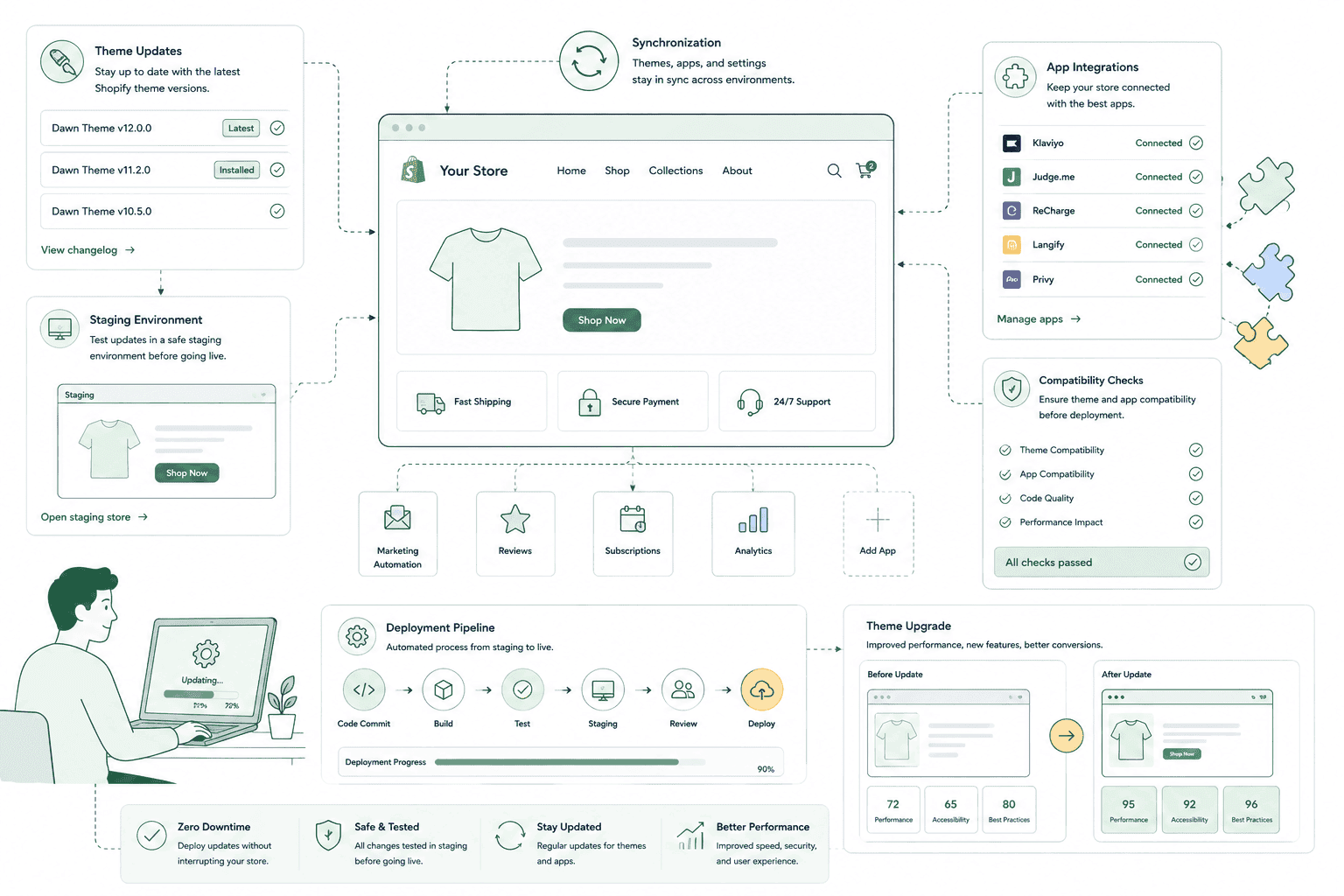
Why it matters
Updates don't break stores. Updating in the wrong place does.
A theme update is not a patch — it's a new copy of the theme. If your theme was customised by editing its files directly rather than extending it, every one of those edits sits in files the update replaces, and applying it wipes them. App updates fail differently: an app changes the markup or class names it injects, and the custom section your developer built against that markup quietly stops working. Neither failure announces itself. The store keeps loading, the analytics keep reporting, and you find out when a customer emails. The fix isn't to avoid updates — outdated apps and themes accumulate security and compatibility debt. The fix is to never test them on the theme customers are looking at.
Sound familiar?
Nobody owns updates at your store, and it shows.
These are the states we find most often when a merchant asks us to take over update management. One of them is a belief, not a symptom — and it's the expensive one.
- Your theme is several versions behind and nobody can remember what was customised in it.
- An app update once broke a page, so now nobody updates anything at all.
- Your theme editor shows an update banner and you have no idea what pressing it does.
- You assume Shopify tests app and theme updates for compatibility with your store first.
- Customisations were made by editing theme files directly, not by adding sections or blocks.
- A custom app or integration is pinned to an API version you can't name off-hand.
What's included
What update management covers
Every change is applied to a copy, tested, then published — with the previous version left in place so we can put it back in a minute.
Duplicate-theme workflow
Nothing gets updated on the published theme. We duplicate it, apply the update to the copy, diff it against your customisations, then re-apply anything the update overwrote. Only when the copy is verified does it get published — and the old version stays in the theme library as an instant rollback.
Full checkout-path testing
Homepage to product to cart to checkout to order confirmation, on mobile and desktop, after every update. Most update regressions surface in the cart or on a variant selector, not on the pages people think to look at. We also run a real test order where the change touches payment or shipping logic.
App version and release tracking
We watch changelogs for the apps that actually inject storefront code — reviews, bundles, subscriptions, upsells, wishlist. When one ships a breaking change or a new script tag, you hear it from us before it lands, not from a support ticket three weeks later.
Online Store 2.0 customisation audit
Whether updates are safe is decided by how the theme was customised. Custom sections, blocks, snippets and app extensions survive an update. Edits made inline in core theme files do not. We map which is which so you know, before a release, what an update will actually cost you.
Deprecation and API version watch
Shopify ships a new Admin and Storefront API version each quarter and supports each one for around a year. Custom apps, integrations and scripts pinned to an old version stop working when it retires. We track what you're pinned to and schedule the migration before the deadline, not after the outage.
Rollback plan on every release
Before we publish, we record the current theme version, the app versions in play and any settings being changed. If something surfaces after go-live, reverting is a single publish, not an archaeology project. Updates are scheduled outside your peak trading hours by default.
How it runs
How updates actually get shipped.
A monthly release window covering routine app and theme updates, with security-critical releases handled inside 48 hours rather than held for the batch.
- 01
Inventory and pin
We record every app that touches the storefront, your theme name and version, and the API versions your custom apps are pinned to. Without this baseline nobody can say what an update will affect.
- 02
Apply to a duplicate
The published theme is duplicated and the update applied to the copy. We diff the result against your customisations and re-apply anything the new version overwrote.
- 03
Test the real journey
Full checkout path on mobile and desktop, plus the specific surfaces that app touches. A test order where payment, shipping or discount logic is in scope.
- 04
Publish and watch
Published outside peak hours, previous version kept as rollback, and error rates plus checkout completion watched for the next 24 hours before we call it done.
0
Updates on live
Duplicate theme, every time
48 hrs
Security releases
Not held for the batch
~4
API versions a year
Shopify ships quarterly
Full
Checkout path retested
Cart to order confirmation
Straight answer
Sometimes the honest answer is that updating is no longer the job.
A good fit if…
- You run a customised Online Store 2.0 theme and want updates applied without losing that work.
- Your store depends on several apps that inject storefront code and change without warning.
- You have custom apps or integrations pinned to Shopify API versions nobody is tracking.
- You have no internal developer, and pressing Update in the admin genuinely worries you.
Probably not, if…
- Your theme is so heavily hacked that updating it costs more than rebuilding it properly.
- You run a stock theme with zero customisations — Shopify's own update flow is enough.
- You want updates applied straight to the live theme to save time. We won't do that.
- You have an in-house developer already running a staging theme and release process.
Keep exploring
More on Shopify maintenance
App & Theme Updates is one part of what an ongoing Shopify retainer covers. Here's the rest of the picture.
Shopify Maintenance & Support
The complete retainer — monitoring, patching, fixes and the reporting behind them.
View the serviceClosely relatedBackups & Disaster Recovery
The safety net behind every update. Shopify does not back your store up for you.
Read the guideClosely relatedBug Fixes & Quick Wins
When an update does break something small, this is the queue that clears it.
Read the guideAll guides in this series
- Uptime Monitoring & Incident ResponseShopify rarely goes down. Your theme, apps and DNS are a different story.
- Security & Vulnerability PatchingShopify secures the platform. Your apps, staff access and custom code are yours.
- Content & Copy UpdatesCampaign pages, banners and seasonal swaps, without a developer bottleneck.
- Analytics & Monthly ReportingA report that names what changed and what it did, not a dashboard screenshot.
- Quarterly Strategy ReviewsDeciding what to build next quarter, and what to stop paying for.
Beyond this service
Other things we do
Most stores need two or three of these working together. Book a call and we'll tell you which ones actually move your numbers.
- Shopify Theme DevelopmentCustom themes built from Figma to production Liquid on Online Store 2.0 — fast and merchant-editable.
- Shopify App DevelopmentCustom and public apps, Checkout UI Extensions and Shopify Functions built with React and Polaris.
- Shopify MigrationMove from WooCommerce, Magento or BigCommerce with a full 301 redirect map and zero downtime.
- Shopify SEOTechnical audits, Core Web Vitals, structured data and collection content built around buyer intent.
- Shopify Performance OptimizationFaster load times and green Core Web Vitals — theme refactors, image pipelines and app cleanup.
- Shopify A/B TestingHypothesis-led experiments on product pages and checkout, shipped as native theme code.
- Shopify Email Marketing & KlaviyoFlows, segmentation and campaigns — welcome, abandoned cart, winback and SMS, built and monitored.
- Shopify CRO & FunnelsValue-ladder, tripwire, quiz and post-purchase upsell funnels built to lift conversion and AOV.
- Shopify Maintenance & SupportRetainers covering uptime monitoring, security patching, bug fixes and proactive improvements.
Frequently asked questions
- It depends entirely on how those customisations were made. Work added as new sections, blocks, snippets or app extensions survives an update, because the update doesn't touch those files. Edits made directly inside the theme's core Liquid, CSS or JavaScript files do not survive — a theme update replaces those files with the new version. That's why we audit the theme before updating anything: we need to know which of your changes will be overwritten so we can re-apply them on the duplicate before it goes live.
Behind on updates?
Book a 30-minute call. We'll tell you what's safe to update, what needs care, and whether your theme is worth updating at all.
Book a free call